
Upload vendor documents
Send Rebridge an invoice, order confirmation or prebook as a PDF, image, CSV or Excel file, and follow it from reading to review.
What you can upload
Any vendor document that lists what you are buying: an invoice, an order confirmation or a prebook. It can come from any vendor, in any layout, with nothing to set up first.
- Images: JPG, PNG or WebP, such as a photo of a paper invoice
- CSV and Excel (.xls or .xlsx)
Each file can be up to 10 MB.
Upload a document
- Open Purchase Orders.
- Drop the file on Drop a document here, or click it to choose a file.
- The document appears in the list. Click it to follow along.
Upload one file at a time. If you drop several files at once, the first one is uploaded.

- 1Drop your vendor's file here, or click to pick it
One file with several invoices
If a PDF holds more than one invoice, Rebridge splits it, and each invoice becomes its own purchase order, named after the vendor and the invoice number. A spreadsheet that holds several orders is split the same way.
What happens next
On the document's page you can watch it move through Uploaded, Reading, Matching, Review, Syncing and Complete. That page updates on its own. On the Purchase Orders list, click Refresh to see the latest status.
When a document reaches Review, its lines are ready for you. Matched means Rebridge was sure of every line; the order still waits for you to send it. See Review lines before they reach Lightspeed.
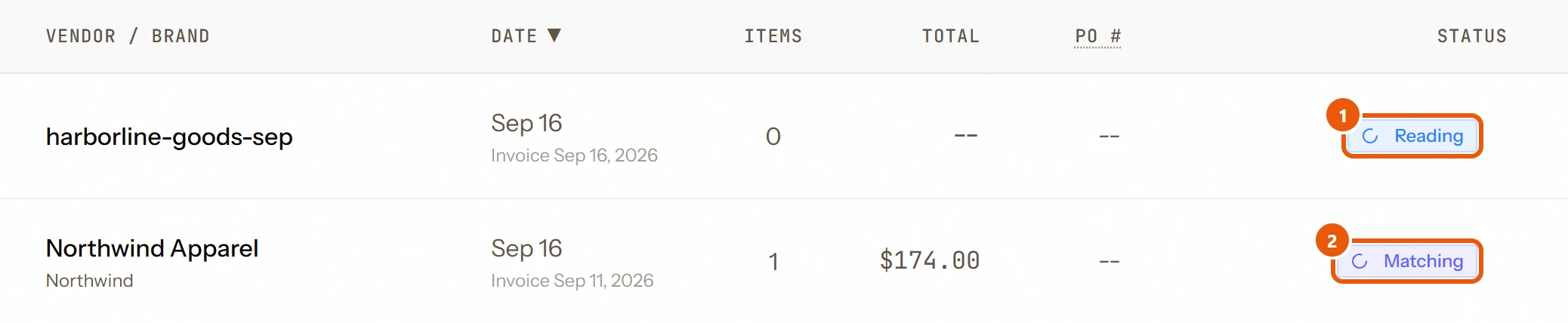
- 1Reading: Rebridge is reading the document
- 2Matching: it's checking each line against your catalog
Uploading the same file twice
If you upload a file with the same name within an hour, Rebridge asks first with Invoice Already Uploaded. Upload Anyway replaces the earlier copy. If the earlier copy was already sent to Lightspeed, Rebridge says Already sent to Lightspeed with its order number and offers Open the order instead: a sent invoice is never replaced or sent again.
Questions
Why can't I upload yet?
Uploads unlock once someone at your company confirms their email address: open the email we sent and click the link once. If your plan's purchase orders for the month are used up, the upload says so.
Do scanned or photographed documents work?
Yes, as long as the text is clear. If a PDF is password-protected, save an unlocked copy and upload that.
Can I email documents to Rebridge?
Not at the moment. Upload them on the Purchase Orders page.
Are order confirmations and prebooks handled differently?
No. They go through the same reading, matching and review as an invoice, and become a purchase order in Lightspeed, so the order is visible before the goods arrive.
Still need help?
Email support@rebridge.ai with the document name or purchase order number and what you see on screen. We reply within 24 hours. Or go back to the Help Center.