
Send a purchase order to Lightspeed
What happens when you send an approved order: the purchase order, new products and variants, and cost updates in your Lightspeed store.
Send the order
When the lines are decided, click Send to Lightspeed and confirm. Rebridge shows Sending to Lightspeed while it works, and the button reads Sent to Lightspeed once the order is in your store.
If you approve or reject the last waiting line, the order is sent as part of that step, after you confirm.
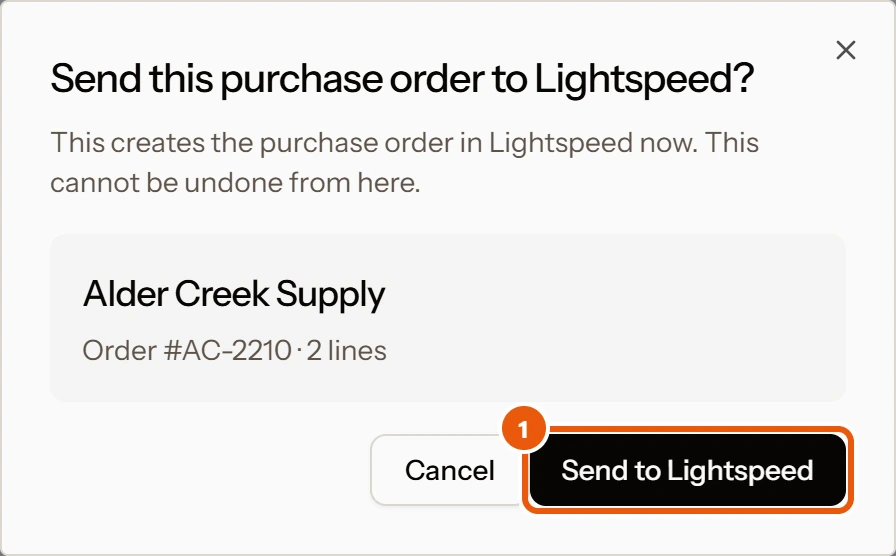
- 1Send it, once you've had a look
What Rebridge creates in Lightspeed
- The purchase order, with the vendor, the shop it is for, the reference from the document, and every line.
- New products and new variants the order needs, set up the way your catalog is organized.
- Cost updates on reorders, so each product carries the vendor's current cost.
- A vendor or brand, if your store does not have it yet.
Nothing is written to Lightspeed before you send.
Retail prices on reorders
When the document lists an MSRP, a reorder updates the product's retail price to match, and a price you type on the line's card is always used. If you would rather keep your own retail prices on reorders, email support@rebridge.ai and we will set your store that way.
Which shop the order is for
If you have more than one shop, Rebridge matches the delivery address on the document to your locations. When there is no match, the order goes to your default shop.
Receiving the stock
Rebridge does not receive the order for you. When the goods arrive, receive the purchase order in Lightspeed as you normally do. Every order is a standard Lightspeed purchase order, so nothing about receiving changes.
If the order doesn't match the document
After sending, Rebridge reads the order back from Lightspeed. If it differs from the document, the status becomes Check against invoice and a banner says This purchase order may not exactly match your invoice.
If part of the order did not go through, you see Part of this order did not reach Lightspeed with View the line.
On X-Series
Lines for the same product are combined into one line at the average cost, and the order is created as an open order. Freight charges on the document are left off X-Series orders.
Questions
Can I undo a purchase order after sending it?
Not from Rebridge. Once it is in Lightspeed, edit or delete it there like any other purchase order.
What counts toward my plan's purchase orders?
Each document you send to Lightspeed counts as one purchase order, however many lines it has. Invoices, order confirmations and prebooks all count the same way.
Am I locked in?
No. Every order is a standard Lightspeed purchase order and every product is a normal Lightspeed product, so they stay in your store whether or not you keep using Rebridge.
Still need help?
Email support@rebridge.ai with the document name or purchase order number and what you see on screen. We reply within 24 hours. Or go back to the Help Center.